Do your approvers have to open the SAP Business One client to approve a purchase order, goods receipt PO or A/P invoice?
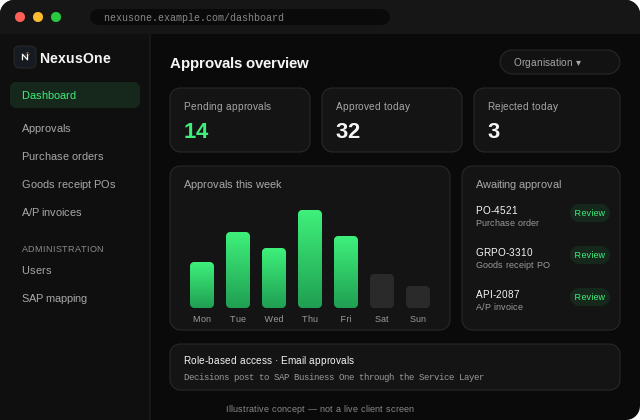
NexusOne removes that need. Approvers approve from a browser or from a link in an email.
Ximus is an independent team. We build add-ons, integrations and web applications for SAP Business One. We also make NexusOne, our own approval product.
Technology we work with
Do your approvers have to open the SAP Business One client to approve a purchase order, goods receipt PO or A/P invoice?
NexusOne removes that need. Approvers approve from a browser or from a link in an email.
Do your other systems and SAP Business One need to share data?
We connect SAP Business One to web applications, third-party applications and Microsoft 365 email, through Service Layer and DI API.
Does SAP Business One stop short of a step in your process?
We build add-ons that work inside SAP Business One.
Not sure where to host your application?
We plan the cloud deployment and setup with you, and we agree the hosting target together.
Each service below says what we do for you.
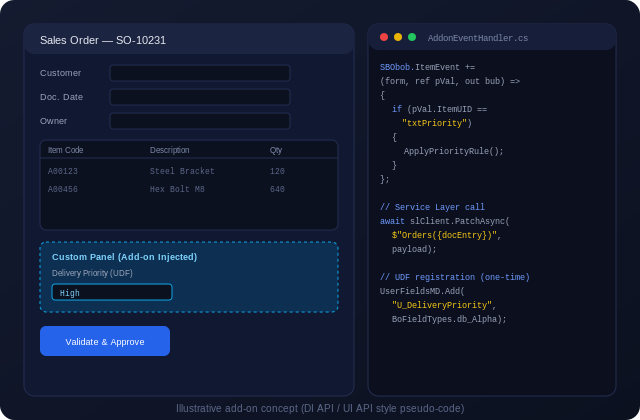
We build add-ons that work inside SAP Business One, using the UI API and DI API. They can react to document events, such as an invoice being posted.
How add-ons workWe plan and set up the cloud deployment of your add-ons and web applications. We agree the hosting target with you.
How cloud deployment worksWeb applications built on your SAP Business One data. NexusOne is our own example.
We connect SAP Business One to web applications, third-party applications and Microsoft 365 email, through Service Layer and DI API.
Mobile apps for SAP Business One users.
Questions about your SAP Business One setup? Talk to us.
Need Azure AD in a project with SAP Business One? Talk to us.
Crystal Reports output from SAP Business One, for example PDF documents attached to approval emails.
Ask us about support after go-live.
Ask about supportWhen SAP Business One does not cover a step in your process, we can build an add-on for it.
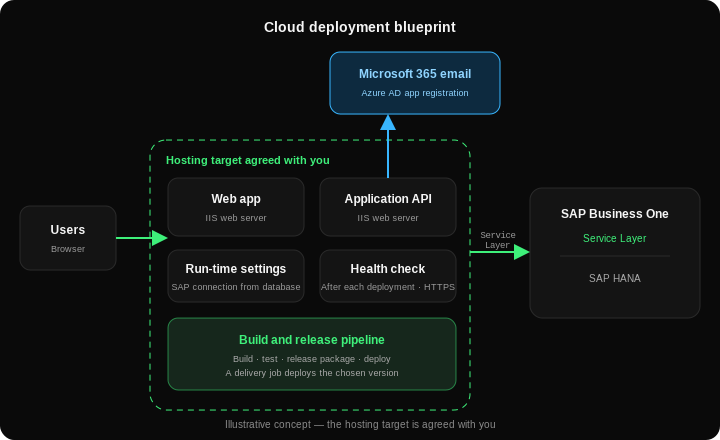
We plan and set up the cloud deployment of your add-ons and web applications, including release and upgrade deployments. The hosting target is agreed with you.
The delivery steps we have built for NexusOne:
 Our product
NexusOne lets approvers act on SAP approval requests from a browser or from a link in an email, without the SAP Business One client. We built it and we run it.
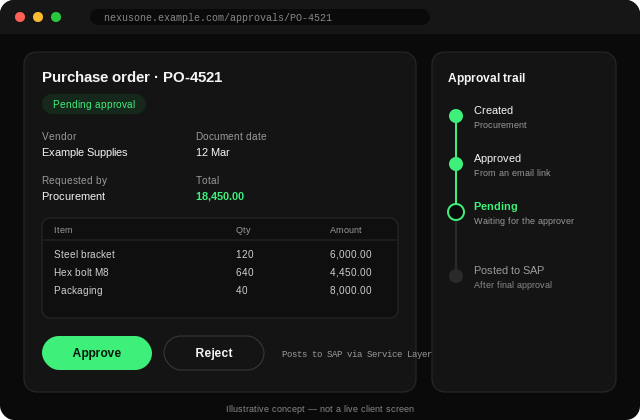
Approve purchase orders, goods receipt POs and A/P invoices from a browser or an email link.
NexusOne checks SAP for newly pending approvals and emails the approver, with the line items of the document.
When an approver decides, the decision is written back to SAP through Service Layer. Converted purchase orders are written back the same way.
An approver's pending items can be rerouted to a delegate, using named rules. After approval, NexusOne converts the draft to a purchase order automatically.
Several SAP companies from one deployment. Role-based user management with SAP user mapping.
Protected session cookies, CSRF protection, and HTTPS enforced in production.
These are illustrative concepts of the kind of work we do. They are not screens from client systems.
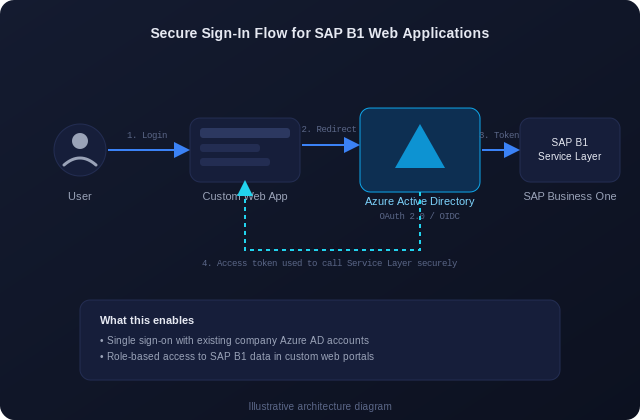
Concept: a web application that uses Azure AD and calls SAP Business One through Service Layer.
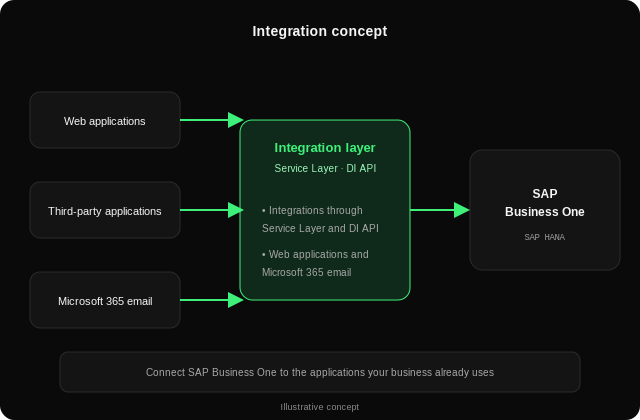
Concept: web applications, third-party applications and Microsoft 365 email connected to SAP Business One through Service Layer and DI API.
Tell us what you need SAP Business One to do. We solve your problem and stay until it's fixed.
Talk to us about your projectSend a short note about what you want SAP Business One to do.
We confirm with you what will be built.
We build the add-on, integration or web application for SAP Business One.
We plan the deployment with you and agree the hosting target.
Tell us if you need a project or ongoing help. We agree the terms with you.
NexusOne is built and run by the Ximus team.
NexusOne has architecture and deployment guides and a tracked bug history.
Add-on database scripts exist for both SAP HANA and SQL Server.
Ximus is an independent team, not a registered company. Engagements are taken on directly with the team.
Tell us what you need. We confirm the scope with you, then we build and deploy. You can use the form below or write to info@ximus-corp.in.
Our add-on database scripts exist for both SAP HANA and SQL Server. NexusOne is built for SAP Business One on SAP HANA, and its own data is kept in SQL Server.
Yes. We plan the cloud deployment and setup for your add-ons and web applications, and we agree the hosting target with you.
NexusOne uses protected session cookies and CSRF protection, and it enforces HTTPS in production. SAP credentials and each organisation's Service Layer address and company database are loaded at run time from its database, not from page code.
Ask us about support after go-live. We agree the terms with you.
No. They are illustrative concepts, not live client screens.
No. Ximus is an independent team, not a registered company. Engagements are taken on directly with the team.
Tell us what you need SAP Business One to do. Write to info@ximus-corp.in or use the form.
Ximus is an independent team, not a registered company.